
Wazuh SIEM — security monitoring
& vulnerability detection
Deploying Wazuh as a self-hosted SIEM on my home server via Docker. Using it to monitor security events, detect real CVEs in installed packages and act on findings by removing vulnerable software from a live system.
Overview
Running a home server with a growing number of services means an expanding attack surface. Installing software, pulling Docker images and keeping packages up-to-date introduces the constant possibility of known vulnerabilities slipping in unnoticed. The answer in a production environment is a SIEM: Security Information and Event Management system, and Wazuh is one of the most capable open-source options out there.
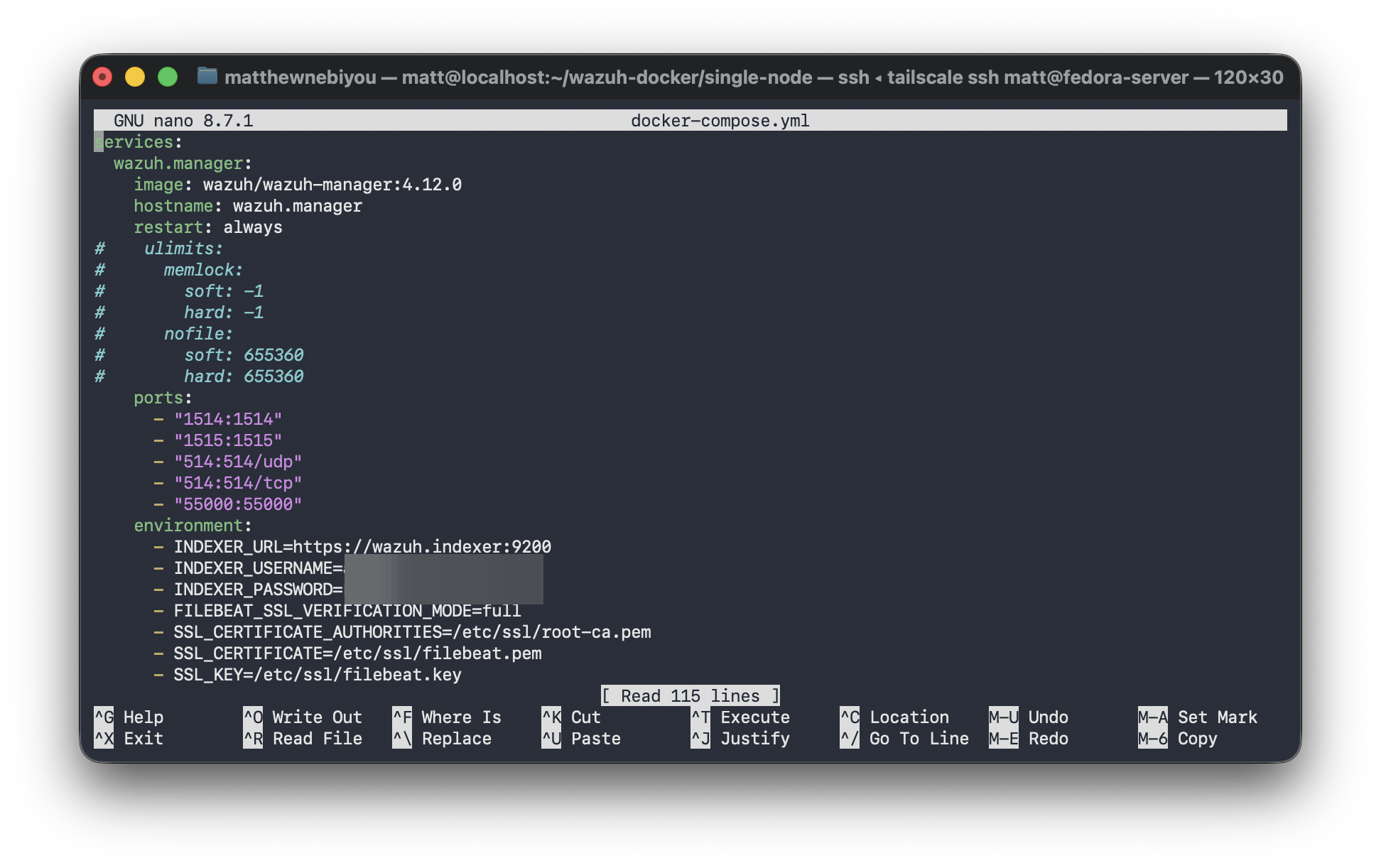
I deployed the full Wazuh stack via Docker Compose on my Fedora Server: the Wazuh Manager for event collection and analysis, Wazuh Indexer for indexing and storing analysis of security alerts generated, the Wazuh Dashboard, an OpenSearch-backed web UI for visualizing alerts and vulnerability findings in real time, and a Wazuh agent installed directly on the host OS to monitor the system itself.
This wasn’t a lab exercise with simulated data. Wazuh’s vulnerability scanner found real packages installed on my live server with confirmed CVEs , including pycrypto and pyasn1, Python libraries flagged at severe and high severity respectively. I verified each finding against the National Vulnerability Database, confirmed the packages were present on the system and removed them. As a result, the server is measurable more secure.
What is a SIEM? A Security Information and Event Management system collects, aggregates and analyzes log and event data from across an environment to surface threats, anomalies and policy violations. Wazuh extends this with host-based intrusion detection and vulnerability scanning, which makes it a full security operations platform and not just a log aggregator. It’s widely used in professional SOC environments alongside tools like Splunk and Elastic SIEM.
Deployment architecture
Stack components
Docker Compose configuration
Real findings — CVEs detected on live system
The most significant outcome of this deployment was what Wazuh found immediately after the vulnerability scanner ran against the system’s installed packages. These were not simulated findings: they were real packages on my production server with real CVEs confirmed in the National Vulnerability Database.
pyasn1 is a Python library for encoding and decoding ASN.1 data structures, used under the hood by cryptography and network libraries as a dependency. Wazuh’s vulnerability scanner flagged the installed version as matching a high-severity CVE entry in the NVD.
Critically, this was a transitive dependency, meaning it was a package I did not explicitly install, but which had been pulled in automatically as a requirement of something else. This is one of the most common real-world vulnerability patterns and one of the hardest to catch without automated tooling. Without Wazuh running, it would have remained on the system indefinitely.
After verifying the finding against the NVD entry and confirming the installed version matched the vulnerable range, I removed the package and audited dependent software to ensure nothing critical broke as a result. The screenshot below shows the alert as it appeared in the Wazuh Dashboard.
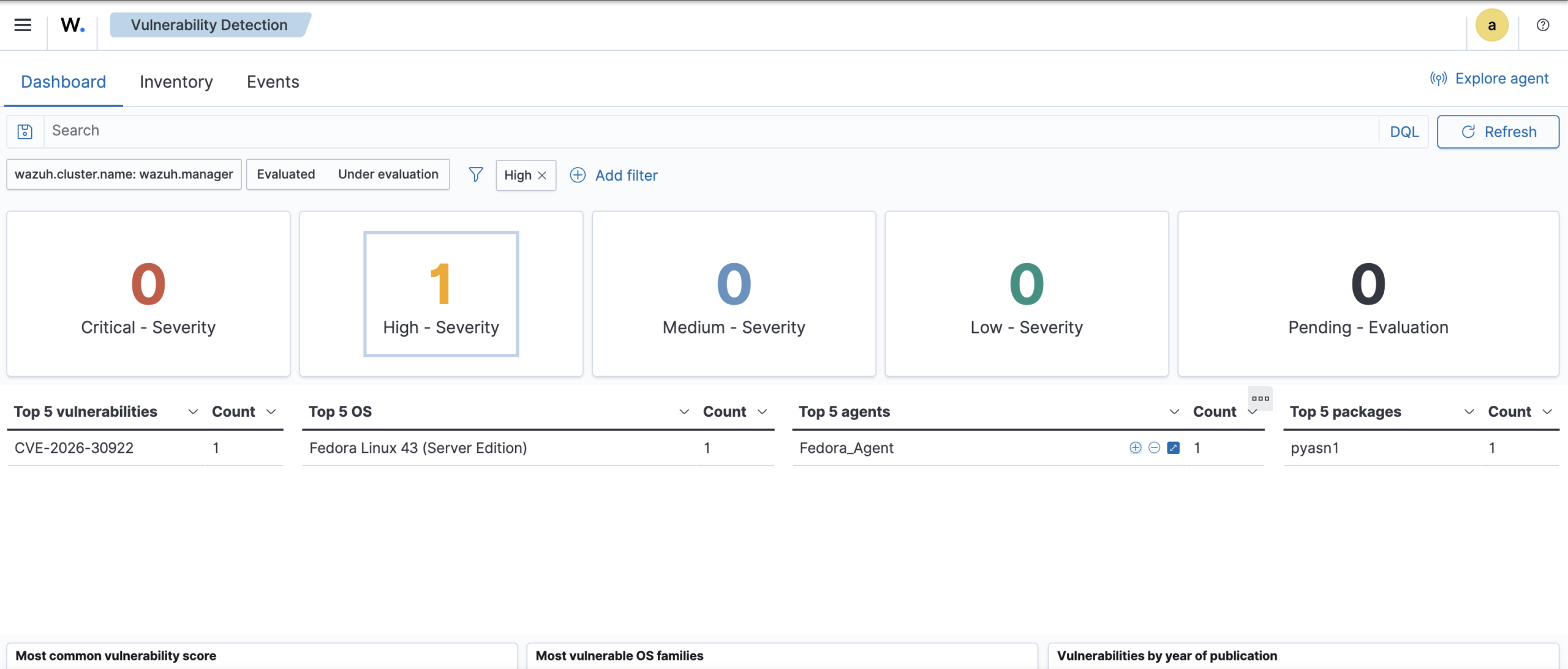
Why this matters: Finding and removing a real vulnerable package (not a simulated one in a lab) is the difference between practicing security and doing it. Wazuh flagged something invisible to manual review and the finding led to a concrete remediation on a live system. This is what security monitoring is made for.
Wazuh capabilities – Usage
| Capability | What it does | Status |
|---|---|---|
| Vulnerability detectionPackage scan against NVD CVE database | Identifies known CVEs in packages installed on monitored hosts, ranked by severity | Active |
| Log analysis & alertingSyslog, auth logs, application logs | Ingests and analyzes system logs against built-in and custom rule sets to generate security alerts | Active |
| File integrity monitoringWatches critical system paths | Alerts on unexpected modifications to monitored files and directories (detects tampering) | Configured |
| Security configuration assessmentCIS benchmark auditing | Audits system configuration against hardening benchmarks and flags deviations | Exploring |
| Active responseAutomated threat reaction | Automatically blocks IPs, kills processes or runs scripts in response to confirmed alerts | Planned |